Menu


Document Batch Audit
Batch print & export SAP-linked documents in minutes — not weeks. Purpose-built for audits, inquiries, and large pulls across ArchiveLink and K-Pro attachments.
Document Batch Audit removes SAP’s one-document-at-a-time limitation for viewing/printing by automating the mass download and batch printing of documents tied to your SAP transactions. It works with both ArchiveLink repositories and K-Pro documents (SAP “attachments”) stored in the SAP database. Result: faster audits, faster responses, less manual work. For customers already using Verbella’s V-Link Connector or SAP Archiving & Migrations services, Document Batch Audit extends that same efficiency to mass document retrieval and compliance workflows.
Key outcomes:
Cut audit prep from weeks to minutes with batch print/export.
Pull ArchiveLink content and K-Pro attachments together in one pass.
Use flexible selection screens to target exactly what auditors need.
Reduce paper/toner with mass download to a secure work area.
Support distributed teams — multiple users, multiple locations
What It Does
Mass Print & Download: Generate complete document packets or export files for offline or auditor review.
Works Across Content Types: Includes both ArchiveLink-stored images and K-Pro (SAP DB) attachments.
Targeted Selection Screen: Filter by company code, document type, date range, vendor, or customer.
Pre-Built Scenarios: Ready for financial audits, HR file pulls, and proof-of-delivery (POD) requests.
Imaging Audit Report (FI): Identify SAP FI transactions missing linked images before audits. Pair Document Batch Audit with Universal Document Access (UDA) to quickly locate and view individual records or transactions inside SAP.
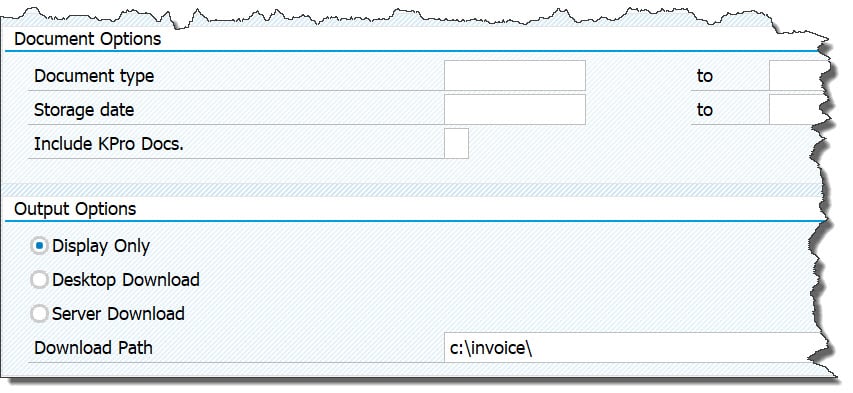
Flexible selection screen — define your document type, date range, and output options for batch printing or download.

Batch results view — complete list of processed SAP documents with links to PDF files and an index for easy auditor access.
How It Works
Select your scope — choose document type, storage date, and output option (display, desktop, or server).
Collect linked content — Document Batch Audit retrieves all related ArchiveLink and K-Pro documents.
Generate your output — create complete packets for batch printing or mass download to a secure path.
Validate completeness — run the optional FI Imaging Audit Report to identify missing documents.
Who Uses It
Accounts Payable / Finance – Period-end reporting, external audits, and vendor inquiries.
Operations / Customer Service – Proof-of-Delivery (POD) and supporting document pulls.
Human Resources – Secure high-volume document retrievals for compliance and audits.
Security
Honors all SAP authorizations and roles — users only see documents they are permitted to access.
Works with your existing ArchiveLink-certified repositories and K-Pro attachments without system changes.
Technical Fit
SAP Platforms: ECC and S/4HANA
Content Repositories: Any ArchiveLink-certified system
Output Options: Display only, desktop download, or server download to a defined path
Frequently Asked Questions
Verbella Document Batch Audit
What problem does Document Batch Audit solve?
SAP’s standard tools let you retrieve/print only one ArchiveLink document at a time. Document Batch Audit automates mass printing/export, saving huge time in audits and investigations.
Does Document Batch Audit work with SAP “attachments” (K-Pro)?
Yes. You can include K-Pro documents stored in the SAP database alongside ArchiveLink content in the same batch.
Which departments benefit most from using Verbella’s Document Batch Audit?
Finance/AP, HR, and teams that need Customer Invoice/Proof-of-Delivery packets frequently.
Can non-SAP users access the packets with Verbella’s Document Batch Audit?
Yes. Exported packets can be shared from a secure location so auditors or business users without SAP access can review them.
What’s unique about the FI edition in Document Batch Audit?
It includes the Imaging Audit Report to quickly surface FI transactions missing linked images, so you can fix gaps before auditors ask.
“Document Batch Audit saves us thousands of dollars in payroll auditing. We used to dedicate a full-time A/P resource on a monthly basis to assist the auditors. Our resource had to retrieve the documents and then print them one at a time. We are talking about hundreds, if not thousands, of documents at a time. Now we give the auditors secure access to the Document Batch Audit and they can quickly print or download the documents themselves.”
Accounts Payable Manager, Distribution Company
Get our Universal Document Batch Audit Fact Sheet sent to you.
Why Choose Verbella?
For over 20 years, Verbella has helped SAP customers automate and simplify how they capture, manage, and archive business documents. Our team combines deep SAP expertise with proven integration experience across leading technologies like Tungsten Automation, OpenText, SharePoint, and PBS delivering end-to-end solutions from AP Automation to enterprise content management.
We partner closely with our clients to understand their goals, tailor solutions, and provide dedicated support that ensures lasting success.