Menu


Streamline Accounts Receivable with powerful data capture and automated electronic deposit
Integrated with Tungsten (formerly Kofax) Capture, Depsosit21 accurately captures check data, handles all deposit file creation and transmission securely, and eliminates paper processes. This proven solution speeds up cash flow, reduces labor, and makes your A/R operation faster and more efficient.
Making A/R Easier
Accounts Receivable (A/R) capture is a tough job that requires top-notch tools. Deposit21 is great at capturing check data and depositing the checks electronically. Tungsten (formerly Kofax) Capture is excellent at capturing information from various documents and forms, providing a highly flexible workflow model. These two software products bring their capabilities together to cover all the bases for your A/R requirements.
Capturing Accurate Check Data
Deposit21’s check data capture ensures efficient, accurate determination of check amounts and MICR line data. Both the A/R process and modern electronic deposit rely on accurate check data, so Deposit21 goes to great lengths to ensure the data is correct with a minimum of manual labor. Any required check data entry is accomplished using distributed image data entry, minimizing the number of keystrokes.
Electronic Deposit Done Right
Deposit21’s electronic deposit capabilities are unmatched. Every possible aspect of the process is automated, such as deposit file creation, encryption, transmission, and bank confirmation. Your cash flow is safe, secure, and closely monitored through each step in the process. A rich web portal provides dashboard views, reports, and much more.
Full Software Compatibility
Deposit21 is fully compatible with Tungsten Capture. A set of custom modules with a simple batch class and document-level properties is provided to make integration as straightforward as possible. A sample application and testing tools are also available.
Deposit21 is a Proven Product
Deposit21 has proven itself since 2006 in a wide range of demanding applications, including a number of state and local tax operations. The software has processed billions of dollars of deposits and earned a great reputation with both its users and their banks.
Tangent Systems is a Proven Vendor
Tangent Systems has been providing leading-edge imaging and document processing software technologies for almost 30 years. Tangent’s software products have been used around the world, processing tens of billions of items in a wide variety of different applications. Tangent’s domestic customers have included some of the country’s largest insurance companies, banks, utilities, publishers, and government agencies.
Deposit Checks Without the Paper

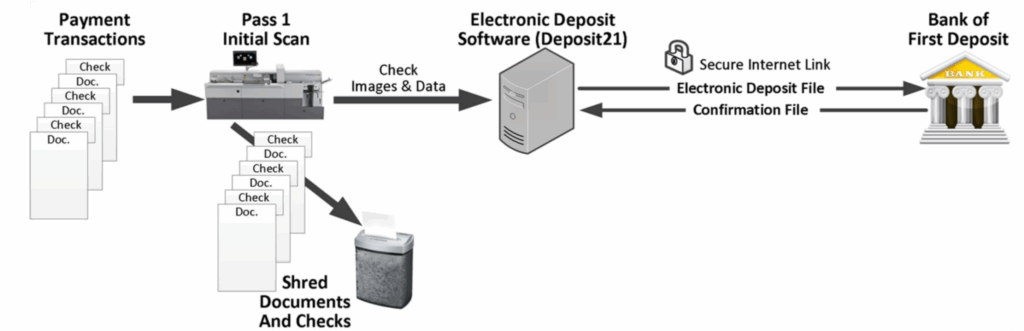
Simpler Processing Cycle
- Image the Checks
- Send Image/Data Files to the Bank
- Shred the Checks
Faster, Cheaper, Better
- Simpler Operation
- Less Labor
- No Courier Costs
- No Second Pass for MICR Amount Encoding
- Longer Processing Day
- Later Bank Deadline, Shorter Processing Cycle
It’s AR with Electronic Deposit
- One Pass Process
- Less Equipment and Labor
- Fully Integrated Deposit Process and Data
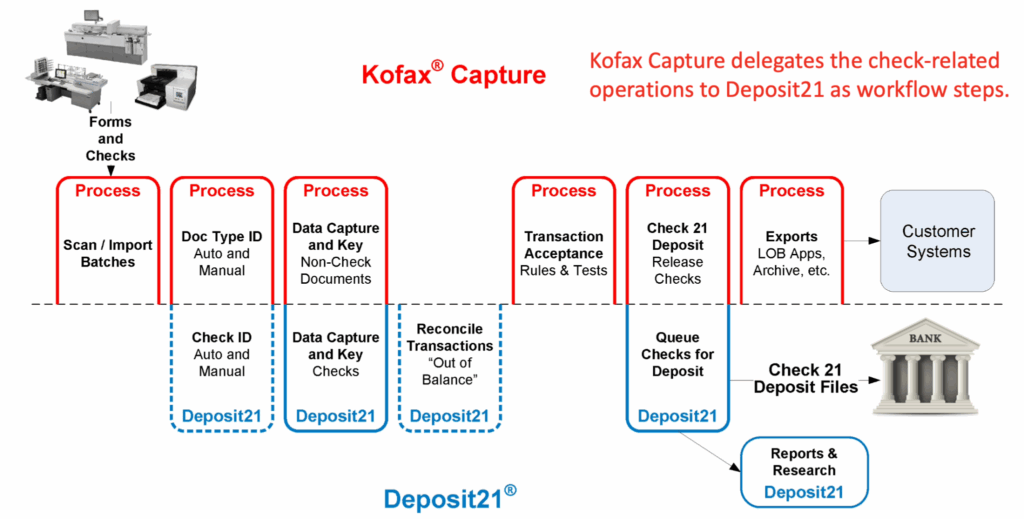
Tungsten (formerly Kofax) Capture delegates the check-related operations to Deposit21 as workflow steps.
Comprehensive Data Capture Features
Check ID & Orientation
Deposit21 determines whether or not a document’s images contain a check, including pages with perforated checks. Each check’s orientation is also detected (front-to-back and/or rotated).
Check Extraction from Page Images
The check portion of a full-page or oversized check document can be automatically extracted, identifying and isolating the check “tear off” area for keying and deposit purposes. This eliminates the need to tear off the checks before scanning, greatly improving transaction integrity.
MICR Line Data Perfection
An ICR engine reads the E13B code line from each check image to read, verify, correct, and/or locate each character in the image. This is especially critical for scanners that lack a magnetic E13B reader to ensure the most accurate MICR line data possible. The image data entry client provides a very efficient, purpose-built dialog for correcting MICR line errors.
Amount Determination
Check courtesy and legal amounts are read using a CAR/LAR engine, which cross-checks and merges results to achieve the best read rate and accuracy. A configurable decision engine implements site policy preferences in how CAR/LAR results and image data entry are utilized. The process integrates nominal payment amounts available from the non-check documents or other sources to minimize data entry. The image data entry client’s optimized check amount entry mode satisfies even the highest speed keyers.
Image Privacy
Adaptive image redaction is built in, sending only non-sensitive portions of the check to the image data entry operators. The Image Privacy rules are easily configurable via the product’s web portal.
Alternate Image Support
If the application also provides enhanced image formats for each check beyond the bitonal images required for deposit, such as gray or color formats, Deposit21 makes good use of them. Keying can be configured to initially use the best image format or to display the bitonal image by default, allowing the operator to switch to the gray or color format with a single keystroke. This yields high accuracy with less labor.
Citrix Compatible
Deposit21’s image data entry client is designed to be packaged as a Citrix application, simplifying deployment and expanding the pool of available keyers, especially for peak periods.
Outsourcing-Ready
Image data entry can be performed remotely, as the client has a firewall-friendly design. The client software is fully buffered for operation over a WAN, so operator throughput is maintained even in a remote environment. Browser-based web amount entry that closely mimics the standard client is also provided.
Comprehensive Electronic Deposit Features
Fully Automated Deposit Workflow
Every step of the deposit process is automated, including file creation, encryption, transmission, confirmation, file download, and processing. It is important to note that the entire process is tightly integrated within the product. There are no “batch files” or command-line transmission client programs. Everything is built into Deposit21, improving reliability, security, support, and process visibility.
Bank-Specific File Processing
Each bank mandates its own variations to the Check 21 file formats, such as custom records, check validations, file naming, transmission, and confirmation file formats. Deposit21 handles all of these differences automatically for every supported bank. This greatly simplifies adding or switching banks.
Prioritized Deposit Routing
Multiple deposit options are automatically considered for each check, as requested, optimizing the deposit process to save time and money. Complex multi-bank deposit schemes can be configured easily, utilizing decision tables that are managed conveniently from the Deposit21 web portal.
Check Image Quality Analysis
Check images are analyzed to ensure that they meet bank-mandated quality measures and technical characteristics. This minimizes costly, time-consuming bank-rejected items.
Easy To Use
Deposit21’s rich web portal provides dashboard views for full work-in-progress visibility, as well as extensive supervisory, reporting, and administration features. Numerous operational and Treasury reports are provided, including a number to assist with reconciliation. Online help and tutorial videos are just a click away.
Research Portal
The web portal’s Research section supports ad hoc queries to locate individual deposits and checks, providing full image, data, and detailed processing and decision history information.
Transparent
Deposit21 monitors its processes, proactively alerting supervisors of any delays or issues. Alert subscribers can elect to receive alerts via email, a systray client, web portal pop-ups, or a combination of methods.
Secure
Every check image Deposit21 stores, even temporarily, is encrypted first. Deposit files are always created in encrypted form, using either bank-mandated or industry-standard cryptography, so they are never stored in clear-text. All bank login/password/key info is kept in a secure, encrypted credentials store. Fine-grained user permissions and Active Directory integration simplify managing users, groups, and authentication. Extensive Audit logging maintains a detailed record of all administrative, supervisory, and security-related actions.
Why Choose Verbella?
For over 20 years, Verbella has helped SAP customers automate and simplify how they capture, manage, and archive business documents. Our team combines deep SAP expertise with proven integration experience across leading technologies like Tungsten Automation, OpenText, SharePoint, and PBS delivering end-to-end solutions from AP Automation to enterprise content management.
We partner closely with our clients to understand their goals, tailor solutions, and provide dedicated support that ensures lasting success.