Menu

V-Link for PaperStream Capture Pro
From the document scanner straight into SAP
Connect PaperStream Capture Pro or Pro Premium directly to SAP ECC or SAP S/4HANA. V-Link, developed by Verbella, delivers captured documents and associated business data into SAP in real time, with no separate middleware, file drops, or batch processing between PaperStream Capture Pro and SAP.
Store documents in your existing SAP ArchiveLink content repository and connect their index information with the appropriate SAP business process or object.
Connect PaperStream Capture Directly to SAP
Native PaperStream Capture Pro Integration: V-Link appears directly within PaperStream Capture Pro as a release destination, allowing the SAP connection to be configured as part of the PaperStream Capture Pro job.
Direct to SAP: Captured documents and associated business data are delivered directly to SAP ECC or SAP S/4HANA using the customer’s existing SAP environment.
No Separate Middleware: Eliminate the need for an additional middleware server, watched folders, file drops, or polling between PaperStream Capture Pro and SAP.
Real-Time Processing: Documents and index information are transferred into SAP as part of the PaperStream Capture Pro release process.
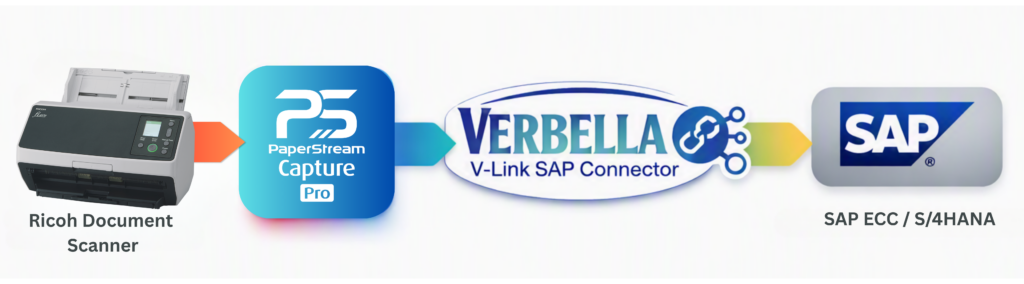
How V-Link Connects PaperStream Capture Pro to SAP
1. Scan & Extract
PaperStream Capture Pro or Pro Premium scans the document batch and captures the index information required for the SAP process.
2. Release to V-Link
The document and associated data are released to the V-Link destination configured for the PaperStream Capture Pro job.
3. Archive in SAP
V-Link transfers each document to the customer’s SAP ArchiveLink content repository and verifies that the document was successfully stored.
4. Post Data to SAP
The associated index values and ArchiveLink document ID are passed to the appropriate SAP function, connecting the archived document with the corresponding SAP business process or object.
Built for Enterprise SAP Document Capture
Flexible SAP Field Mapping
Map PaperStream Capture Pro extraction fields, constants, and transformed values to the appropriate SAP parameters. V-Link can also retrieve available parameter information directly from SAP to simplify configuration.
SAP ArchiveLink Integration
Store captured documents in the SAP ArchiveLink content repository the organization already uses while maintaining the relationship between archived content and SAP business data.
Configurable Data Transformations
Apply configurable formatting and transformation rules when PaperStream Capture Pro data needs to be prepared or adjusted before being sent to SAP.
Secure Credential Handling
Protect connection credentials with encrypted credential storage rather than storing sensitive information as plain text.
Detailed Logging & Traceability
Comprehensive trace logging and Windows Event Log integration give IT and operations teams visibility into connector activity and troubleshooting.
Reusable Configuration
Export and import V-Link settings between workstations to simplify configuration across PaperStream Capture Pro environments.
Extend Your Workflow with PaperStream Capture Pro AI
Organizations that want intelligent document processing can combine V-Link with the optional PaperStream AI add-on.
PaperStream Capture Pro AI can enhance the capture process with AI-powered document processing and data extraction. V-Link then provides the connection that delivers the resulting documents and business data into SAP.
PaperStream Capture Pro AI is not required to use V-Link. Customers can connect PaperStream Capture Pro or Pro Premium directly to SAP with V-Link whether or not PaperStream Capture Pro AI is part of their environment.
Designed for SAP ECC and SAP S/4HANA
Works With
- SAP ECC
- SAP S/4HANA
- SAP ArchiveLink
- PaperStream Capture Pro
- PaperStream Capture Pro Premium
- Workflows using the optional PaperStream Capture Pro AI add-on
Technical Foundation
- PaperStream Capture Pro Release API Extension
- Windows workstation
- Microsoft .NET Framework 4.8
- SAP ArchiveLink environment
- Verbella SAP function modules
- SAP .NET Connector, included with the connector
One Connection, Multiple SAP Document Processes
Accounts Payable
Capture invoices and supporting vendor documents and deliver them into SAP for downstream financial and procurement processes.
Delivery & Logistics
Capture delivery notes, proof-of-delivery documents, and other logistics content that needs to be associated with SAP business transactions.
HR & Contracts
Archive employee documents, contracts, and other business records while maintaining their relationship to the appropriate SAP context.
Other SAP Business Documents
Use V-Link for virtually any scanned document that needs to be stored and associated with an SAP business object.
Why V-Link for PaperStream Capture Pro?
Purpose-Built for SAP
V-Link is not generic integration middleware. It is part of Verbella’s family of connectors designed specifically to connect document capture, content, and workflow technologies with SAP.
Keep Your Existing SAP Architecture
V-Link works with the customer’s existing SAP ArchiveLink environment, allowing organizations to extend capture capabilities without creating another document repository or unnecessary integration layer.
Backed by 20+ Years of SAP Expertise
Verbella has spent more than two decades helping organizations automate and simplify how business documents are captured, integrated, managed, and archived within SAP environments.
Frequently Asked Questions
Verbella V-Link for PaperStream Capture Pro
What is V-Link for PaperStream Capture Pro?
V-Link for PaperStream Capture Pro is a Verbella-developed connector that integrates PaperStream Capture Pro directly with SAP. It enables captured documents to be stored in an SAP ArchiveLink repository while associated index information is passed into SAP and connected with the appropriate business process or object.
Does V-Link support both PaperStream Capture Pro and Pro Premium?
Yes. V-Link supports both PaperStream Capture Pro and PaperStream Capture Pro Premium.
Does V-Link work with PaperStream Capture Pro AI?
Yes. V-Link can be used with workflows that include the optional PaperStream Capture Pro AI add-on. PaperStream Capture Pro AI can provide AI-powered document processing and extraction, while V-Link delivers the resulting documents and associated information into SAP. PaperStream Capture Pro AI is not required to use V-Link.
Does V-Link support SAP ECC and SAP S/4HANA?
Yes. V-Link supports both SAP ECC and SAP S/4HANA environments.
How does V-Link send documents from PaperStream Capture Pro into SAP?
V-Link operates as a PaperStream Capture Pro release destination. When a document is released, V-Link stores and verifies the document in the SAP ArchiveLink content repository and then passes the associated index values and document ID into SAP.
Does V-Link require a separate middleware server?
No. V-Link operates as part of the PaperStream Capture Pro release process and does not require a separate middleware server, watched folders, file drops, or polling between PaperStream Capture Pro and SAP.
Where are scanned documents stored?
Documents are stored in the customer’s SAP ArchiveLink content repository, allowing organizations to continue using their existing SAP content architecture.
How is PaperStream Capture Pro metadata mapped to SAP?
V-Link allows PaperStream Capture Pro extraction fields, constants, and transformed values to be mapped to SAP parameters. SAP parameter information can also be retrieved to assist with configuration.
What happens if a document or data transfer fails?
V-Link follows a controlled process that stores and verifies the document before posting the associated index data. The connector includes exception handling designed to prevent incomplete or partially posted records.
What types of documents can V-Link process?
V-Link can support invoices, delivery documents, proof of delivery, HR documents, contracts, and other scanned business content that needs to be associated with an SAP business process or object.
Explore the full V-Link Suite of Connectors Click Logo →
Why Choose Verbella?
For over 20 years, Verbella has helped SAP customers automate and simplify how they capture, manage, and archive business documents. Our team combines deep SAP expertise with proven integration experience across leading technologies like Tungsten Automation, OpenText, SharePoint, and PBS delivering end-to-end solutions from AP Automation to enterprise content management.
We partner closely with our clients to understand their goals, tailor solutions, and provide dedicated support that ensures lasting success.